




AP 5130 (XIII) states that "students have a limited number of times they can change their major. They can do so two times within one academic year. Additionally, major changes are only allowed within the first 2 weeks of the term semester for fall or spring term and 1 week in the summer semester."
If you change your major outside of these dates, the change will NOT be effective for the current term, but for the following term.
To view the steps as a downloadable PDF, click here.
- Log in to your Campus Solutions account and click the ‘Student Records’ tile:

- To activate the college and major selections, answer "No" to the question "Do you want to keep the same major as the previous term?"
Financial Aid students: Make sure you check with your college Financial Aid Office before changing your major, as this can impact and/or delay your Financial Aid.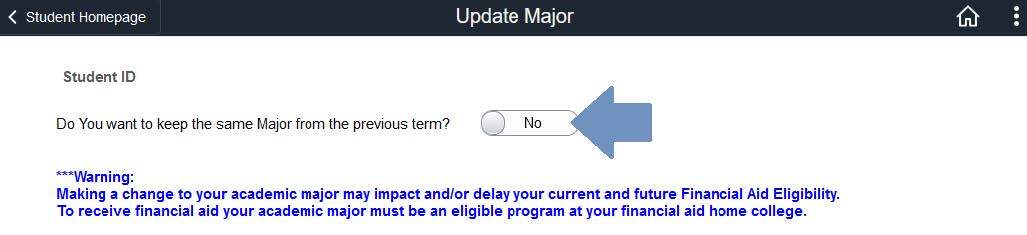
- Once you select a college, all the majors for that college will be available to select from the drop-down menu:
Financial Aid Students: Make sure to select a Financial Aid-eligible major. All Financial Aid eligible majors are marked with an asterisk (*)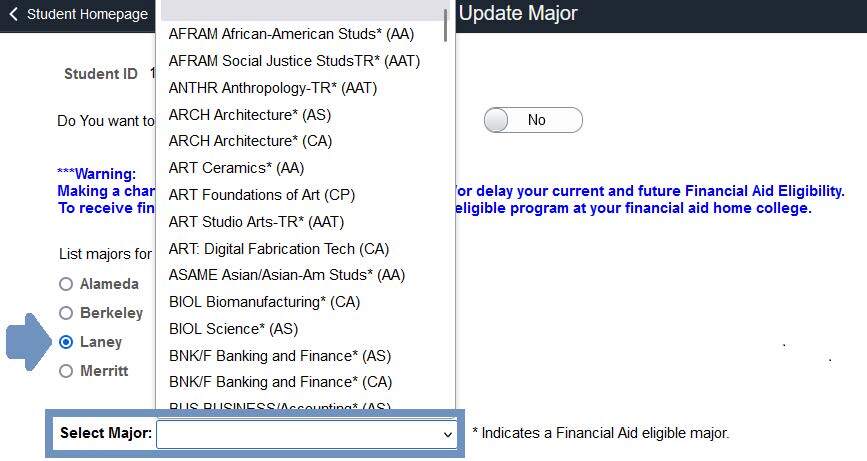
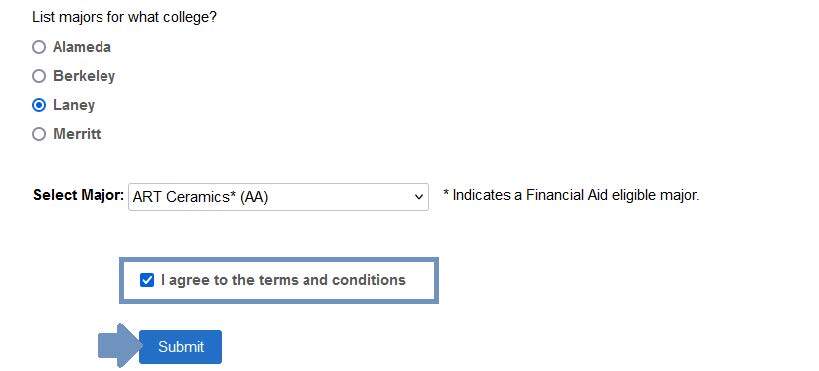
- Once you have selected a major, check the box to agree to the terms and conditions of updating your major and click the submit button:
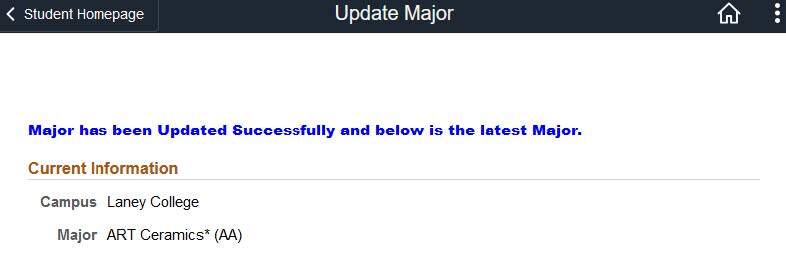
- A confirmation page will display your new major: